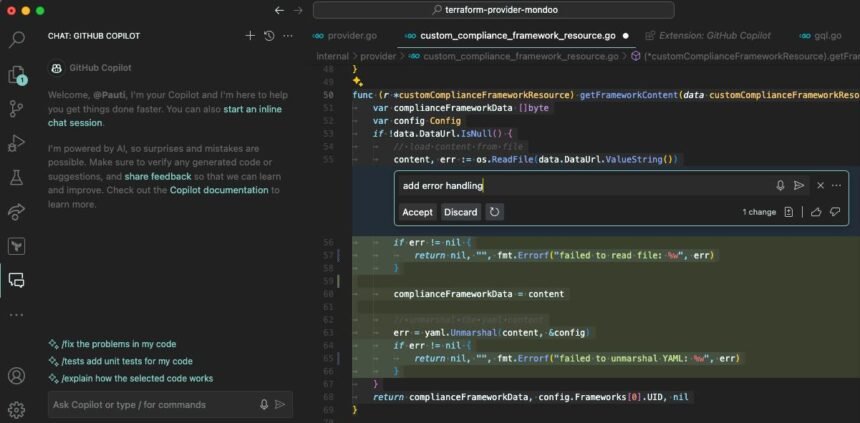
Powerful and Positive Reasons Why GitHub Copilot Is Transforming Software Development
Introduction: What Is GitHub Copilot?
GitHub Copilot: Imagine writing a program and receiving helpful code suggestions while you type. Instead of manually writing every line, searching for every syntax example or repeatedly looking up documentation, you can describe what you want to achieve and receive AI-generated assistance directly in your development environment.
This is the idea behind GitHub Copilot, an AI-powered coding assistant developed by GitHub in collaboration with AI technology partners.
GitHub Copilot can suggest code, generate boilerplate, explain unfamiliar functions, help investigate errors, create tests and support larger software development tasks. Depending on the plan and development environment, it can also assist with code reviews, agent-based workflows and changes across a project.
For students, Copilot can make programming practice more interactive. For professional developers, it can reduce repetitive work. For startups and businesses, it can support faster experimentation and software maintenance.
However, AI-generated code is not automatically correct, secure or suitable for production. Developers must understand, test and review the suggestions they accept.
This Minorstudy article explores GitHub Copilot’s history, features, pricing, benefits, limitations, career opportunities and importance to society.
1. What Is GitHub Copilot and How Does It Work?
GitHub Copilot is an AI coding assistant designed to support developers throughout the software development process.
It integrates with supported code editors and development tools, allowing programmers to receive assistance without constantly switching between their editor and an external chatbot.
For example, imagine a student wants to write a Python program that calculates the average marks of students in a class. The student can begin writing the program and receive suggested code. They can also ask Copilot to explain a function, suggest test cases or help correct an error.
Its key capabilities include:
Inline code completion: Suggesting code as you type.
Boilerplate generation: Creating repetitive structures, templates and common programming patterns.
Copilot Chat: Answering questions about code and programming concepts.
Code explanation: Helping users understand unfamiliar functions and files.
Debugging assistance: Suggesting ways to investigate errors.
Test generation: Drafting tests for functions and application behaviour.
Agent-based development: Helping carry out multi-step coding tasks.
Code review: Identifying possible bugs, security concerns and style problems in supported workflows.
The available capabilities depend on your subscription, chosen model, editor and organisation’s settings. GitHub’s official documentation describes Copilot as a tool that can assist with writing code, understanding repositories, planning changes and preparing work for review.
The important point is that Copilot helps developers work more efficiently, but the developer remains responsible for the final software.
2. History and Evolution of GitHub Copilot
GitHub Copilot developed alongside advances in large language models and AI-assisted programming.
2020: Early foundations
Advances in large language models and code-generation research created new possibilities for AI systems that could understand programming patterns and generate code.
June 2021: Technical preview launched
GitHub announced Copilot as an AI pair programmer developed in collaboration with OpenAI. It could suggest lines and entire functions using the context of the code being written.
June 2022: General availability
Copilot became generally available to individual developers, helping bring AI-assisted code generation into everyday programming workflows.
2023: Expansion to businesses and chat
GitHub expanded Copilot for organisations and introduced additional ways for developers to interact with AI through conversational coding assistance.
2024–2025: More advanced development assistance
Copilot’s capabilities expanded beyond inline suggestions into broader coding workflows, including agentic assistance and code review.
2026: Expanded agent workflows
GitHub continued developing cloud-based coding agents, additional model options, code review and usage-based AI credits. The product increasingly supports multi-step tasks that developers can inspect and approve.
This history illustrates a significant change in programming: AI assistance has expanded from completing a line of code to helping with larger parts of the software development lifecycle.
3. Ten Powerful Benefits of GitHub Copilot
1. Makes programming easier for beginners
Learning programming involves understanding syntax, variables, functions, loops, data structures and logical reasoning. Beginners can become discouraged when they encounter repeated errors.
Copilot can suggest code and explain programming concepts in supported environments. A student learning JavaScript, for example, can ask why a function returns an unexpected result and investigate possible solutions.
The most effective approach is to attempt the problem independently first, then use Copilot to understand errors and compare solutions.
2. Speeds up repetitive coding tasks
Software developers frequently write similar functions, test templates, configuration files and other routine code.
Copilot can generate suggestions for these patterns, potentially reducing the time spent on repetitive typing.
This allows developers to focus more attention on architecture, user experience, complex problem-solving and software quality. However, generated code still needs review, and not every task becomes faster when AI is involved.
3. Supports multiple programming languages
Copilot can assist with many programming languages, including Python, JavaScript, TypeScript, Java, C# and others.
For students, this means they can explore different technologies while using a familiar assistance workflow. For professionals, it can help when working with a language or framework they do not use every day.
The quality of suggestions depends on the task, context, language and selected AI model.
4. Helps developers understand unfamiliar code
Joining an existing software project can be challenging. Developers may need to understand how different files connect, where data is processed and which functions control particular features.
Copilot can answer questions about code and, where supported, use repository context to explain relationships between components.
This can assist with onboarding, maintenance and learning, but developers should verify explanations against the actual source code.
5. Assists with debugging and testing
Finding errors is an essential part of programming. Copilot can suggest possible causes of a problem, explain error messages and draft tests for expected behaviour.
For example, if a function calculates incorrect totals, a developer can provide the function and describe the expected output. Copilot may suggest edge cases or identify a possible logical error.
The developer should run the tests and verify that the proposed fix solves the problem without creating new ones.
6. Helps generate documentation
Good documentation makes software easier to maintain and use.
Copilot can help draft comments, explain functions, summarise code and prepare initial documentation. Developers can then review the material for accuracy and ensure it reflects the actual implementation.
This is particularly useful for teams maintaining older applications or onboarding new contributors.
7. Supports AI-assisted code reviews
Code review helps teams identify bugs, security issues and inconsistencies before software changes are merged.
GitHub Copilot offers AI-assisted code review in supported plans and workflows. It can provide an initial assessment and suggest changes, while human reviewers remain responsible for important decisions.
This can help reviewers focus on design decisions, complex logic and risks that require deeper understanding.
8. Encourages creative software projects
A developer’s idea might involve a learning app, personal portfolio, budgeting tool or small business dashboard.
Copilot can help turn requirements into code suggestions and provide assistance during experimentation.
Students can explore different approaches, build prototypes and learn from the changes they make. This is valuable when experimentation is combined with independent understanding and testing.
9. Helps teams collaborate more effectively
Software teams must coordinate code changes, review pull requests and maintain consistent standards.
Copilot’s organisation-focused features can support coding workflows, policy management and shared development practices, depending on the plan.
AI assistance does not eliminate the need for communication. Teams still need clear requirements, code ownership, testing standards and human approval.
10. Builds practical career skills
Students who combine Copilot with programming fundamentals can use it to develop portfolio projects and gain experience with real-world development workflows.
They can practise building websites, scripts, APIs and small applications while learning how to review and improve AI-generated code.
The long-term advantage comes from understanding the technology, not merely knowing which button to click.
4. Important GitHub Copilot Features
Inline code suggestions
Receive code completions and suggestions for common programming patterns while working in a supported editor.
Copilot Chat
Ask questions about programming concepts, code snippets and supported project context.
Coding agents
Delegate supported tasks to agents that can investigate a repository, make changes and prepare work for review.
Code review assistance
Identify possible bugs, security risks and coding inconsistencies before human approval.
Command-line assistance
Use Copilot CLI in supported workflows to help understand commands, work with code and perform development tasks.
These features are available in different combinations depending on the product, plan and development environment. Consult the official GitHub Copilot documentation for current instructions.
5. GitHub Copilot Costs and Pricing
Pricing is an important consideration for students, freelancers, developers and businesses. GitHub Copilot offers free access as well as paid individual and organisational plans.
The following prices are listed on GitHub’s official pricing page. They are in US dollars, before any applicable taxes or currency conversion.
| Plan | Listed price | Suitable for |
|---|---|---|
| Copilot Free | $0/month | Beginners and occasional users |
| Copilot Pro | $10/month | Individual developers |
| Copilot Pro+ | $39/month | Developers with more demanding AI workflows |
| Copilot Max | $100/month | High-volume individual users |
| Copilot Business | $19/user/month | Development teams |
| Copilot Enterprise | $39/user/month | Larger organisations |
Source: GitHub Copilot plans and pricing.
Important pricing note: GitHub announced changes to individual-plan availability in April 2026, including a pause on new sign-ups for Pro, Pro+ and Student at that time. Check the current checkout page and latest official announcements before purchasing; listed prices do not guarantee that every plan is open to new subscribers.
What does the free plan offer?
GitHub Copilot Free provides a way to explore AI coding assistance without a monthly subscription. Its published offering includes a limited number of code completions and limited chat or agent usage. The exact limits and included models can change.
Can students get GitHub Copilot for free?
Verified students may qualify for GitHub Copilot Student through GitHub Education. Eligibility must be verified, and the Student plan has its own features and usage limits.
However, new Student plan sign-ups were also included in GitHub’s April 2026 availability changes. Students should check the current GitHub Education benefits page for eligibility and activation instructions.
Understanding AI credits and additional costs
Some Copilot features, including agent-based tasks and code review, use GitHub AI Credits. The number of credits consumed can depend on the model and complexity of the task. Traditional inline code completions and next-edit suggestions are treated differently under paid-plan billing.
To control spending:
Begin with free access where available.
Review your monthly usage and remaining allowance.
Choose a suitable model for the task.
Check whether additional usage can be billed.
Set a budget where supported.
For Indian users, the final rupee cost may differ because of currency conversion, taxes and payment terms.
6. GitHub Copilot vs Cursor AI vs Google Gemini
These tools serve different purposes, even though they overlap in AI-assisted coding.
| Feature | GitHub Copilot | Cursor AI | Google Gemini |
|---|---|---|---|
| Primary role | AI coding assistant | AI-first code editor | General-purpose AI assistant with coding capabilities |
| Inline code suggestions | Yes | Yes | Depends on the coding environment or integration |
| Codebase assistance | Supported features | Core editor capability | Depends on the tool or integration |
| Agent-based coding | Available | Available | Available in supported coding tools and workflows |
| Main advantage | Integration with existing development workflows | AI-first editing experience | Broad assistance beyond programming |
| Best starting point | Developers who want assistance in supported IDEs | Developers who prefer an AI-focused editor | Users who want coding and general-purpose assistance |
Which tool should students choose?
Choose GitHub Copilot if you want AI assistance inside a supported editor and GitHub-based development workflow.
Choose Cursor if you want an AI-first code editor with integrated project-level assistance.
Choose Gemini if you want a general-purpose assistant for learning, research and coding questions.
The best option depends on the projects you build, your existing tools, the features available to your account and your budget. You do not need to pay for multiple tools before identifying what your workflow actually requires.
7. Seven Important Facts About GitHub Copilot
- It launched as a technical preview in June 2021. GitHub introduced it as an AI pair programmer.
- It became generally available in June 2022. This marked a major step in bringing AI coding assistance to individual developers.
It supports many programming languages. Suggestions can help with languages and frameworks supported by the chosen environment.
It can generate more than individual lines. Depending on the feature, it can assist with functions, tests, edits and larger coding tasks.
- It supports code review and agents. Some plans provide tools for reviewing pull requests and delegating development tasks.
It offers free and paid access options. Usage allowances, features and subscription availability vary.
It still requires human oversight. Generated suggestions can be incorrect, insecure or unsuitable for a project’s requirements.
GitHub
8. Daily-Life Impacts of GitHub Copilot
Although Copilot is a developer tool, its effects can reach students, businesses and the people who use software every day.
For students
Copilot can explain code, suggest examples and help learners practise programming. Students gain the most when they use it to understand concepts and then solve similar problems independently.
For developers
Inline suggestions and coding assistance can reduce repetitive typing and help developers explore possible solutions. Testing and code review remain essential.
For entrepreneurs
Founders can use AI assistance to prototype ideas, test product concepts and develop initial features. The result still needs validation by real users.
For businesses
AI-assisted development may help teams prepare code, tests and documentation more efficiently. Organisations must also establish privacy, security and quality controls.
In daily life, better software development tools can contribute to improved educational platforms, business applications and digital services. The extent of the benefit depends on how well developers use these tools and maintain the quality of their work.
9. Significance of GitHub Copilot for Education and Society
AI coding assistants matter because software is increasingly connected to education, healthcare, finance, transport, communication and public services.
Making programming more accessible
Beginners can use conversational assistance to explore unfamiliar concepts and investigate programming errors. This may reduce some of the barriers to starting software development.
Supporting innovation
Small teams can experiment with prototypes and test ideas using AI-generated code suggestions. This may help them explore solutions before investing in a larger project.
Improving developer productivity
Automating parts of repetitive coding work may leave developers more time for architecture, product design, testing and complex problem-solving. The actual productivity improvement depends on the task and the developer’s ability to review AI output.
Changing career expectations
As AI tools become more capable, developers may need to focus increasingly on problem definition, system design, debugging, security and evaluating generated code.
This makes programming fundamentals more important, not less. A developer must understand a solution to know whether it works correctly and can be maintained safely.
Promoting responsible innovation
AI-generated code introduces questions about privacy, security, reliability and intellectual property. Organisations need policies that address these risks while allowing developers to benefit from new technology.
Society benefits most when AI-assisted development produces software that is accessible, secure, useful and trustworthy.
10. Risks and Limitations of GitHub Copilot
Every technology has limitations, and understanding them helps users make better decisions.
Incorrect suggestions: Copilot can generate code that looks convincing but contains logical errors or incorrect assumptions.
Security concerns: AI-generated code may introduce vulnerabilities, such as unsafe input handling or improper authentication. Developers should use tests, code scanning and security reviews.
Privacy and confidential code: Users should review GitHub’s data-handling policies and their organisation’s rules before sharing sensitive source code or proprietary information.
Copyright and licensing: Some suggestions may resemble publicly available code. Developers should evaluate licensing and attribution requirements where relevant. GitHub provides settings related to public-code matching and filtering.
Overdependence: Beginners who accept suggestions without understanding them may struggle to maintain their software independently.
Subscription limits: Chat and agent features may have usage allowances or additional costs. Users should monitor their usage rather than assuming every AI feature is unlimited.
The responsible approach is to use Copilot to improve your work while retaining control over the code, decisions and final results.
11. Review Section: Is GitHub Copilot Worth Using?
GitHub Copilot Review
Editorial assessment for students, developers and teams
Overall verdict
GitHub Copilot is worth considering if you write code regularly and want AI assistance within your existing development environment. Its inline suggestions are useful for routine programming, while chat, agents and review features can help with broader tasks on supported plans.
This is an editorial assessment based on documented capabilities, not a hands-on benchmark or a survey of customer ratings.
Advantages
Offers real-time coding suggestions.
Helps generate repetitive code and tests.
Supports programming explanations and debugging.
Integrates with multiple development environments.
Offers free access and student benefits for eligible users.
Provides advanced agent and review workflows on supported plans.
Disadvantages
Suggestions can be incorrect or insecure.
Advanced features have usage limits and plan requirements.
Pricing and availability may change.
Developers must check licensing and privacy implications.
Beginners can become overly dependent on generated code.
Who should use GitHub Copilot? Computer science students, programmers, web developers, software engineers, freelancers and teams that want AI assistance throughout their development workflow.
Who should be cautious? People working with sensitive code, users who cannot review generated suggestions and beginners who expect AI to replace learning programming fundamentals.
12. Career Opportunities for Students Using GitHub Copilot
GitHub Copilot can support students as they develop practical programming skills. It is most valuable when combined with structured learning, independent problem-solving and real projects.
Possible career paths include:
Front-end developer
Back-end developer
Full-stack developer
Python developer
Mobile application developer
Software test engineer
AI application developer
Automation engineer
DevOps engineer
Cybersecurity professional
Copilot alone does not qualify someone for these roles. Employers and clients also value technical knowledge, communication, problem-solving and the ability to build reliable software.
Five projects students can build
1. Personal portfolio website
Practise HTML, CSS and JavaScript while building a website that presents your skills and projects.
2. Student management system
Learn about databases, forms, records and application logic.
3. Expense tracker
Practise Python, data storage, calculations and reporting.
4. Online quiz application
Build question banks, scoring features and answer explanations.
5. Weather application
Practise APIs, JSON data, error handling and user-interface design.
For every project, understand the code, test its functionality and document what you learned. A small, well-tested project is a better demonstration of skill than a large project you cannot explain.
13. Frequently Asked Questions About GitHub Copilot
What is GitHub Copilot used for?
GitHub Copilot assists with code completion, code generation, explanations, debugging, testing, documentation and supported agent-based development tasks.
Is GitHub Copilot free?
Yes. GitHub offers a Free plan with limited usage. Paid plans provide different allowances and features. Check the official pricing page for current details.
Can students use GitHub Copilot for free?
Verified students may qualify for Copilot Student through GitHub Education. Eligibility, activation and usage limits apply. Check the current student benefits page for availability.
Is GitHub Copilot good for beginners?
Yes. It can help beginners explore programming concepts, understand errors and practise writing code. Beginners should still learn the fundamentals and independently verify their work.
Which programming languages does GitHub Copilot support?
It can assist with many popular languages, including Python, JavaScript, TypeScript, Java and C#. The quality of suggestions varies by language, framework and task.
Can GitHub Copilot build a complete website?
Copilot can assist with website components, page layouts, functions, tests and other development tasks. A complete website still needs proper design, testing, security, deployment and maintenance.
Is GitHub Copilot better than Cursor?
Neither is universally better. Copilot integrates AI assistance into supported development environments, while Cursor offers an AI-first editor. Your preferred workflow and budget should guide the decision.
Can GitHub Copilot replace programmers?
No. It can assist with many programming tasks, but people still need to define requirements, make technical decisions, check security, test software and maintain applications.
Is GitHub Copilot safe to use?
It can be used responsibly, but generated code and data-handling practices require review. Follow organisational policies, protect sensitive information and test suggestions before deploying them.
Does GitHub Copilot work in Visual Studio Code?
Yes. GitHub Copilot is available in Visual Studio Code, as well as other supported development environments. The exact features depend on the editor, account and subscription.
Can GitHub Copilot help with freelance work?
Yes. It can help freelancers draft code, troubleshoot errors and develop prototypes. However, freelancers remain responsible for delivering secure, functional work that meets client requirements.
14. Important Points to Remember
GitHub Copilot launched as a technical preview in June 2021.
It became generally available in June 2022.
It provides inline suggestions and broader AI-assisted development features.
It can help students learn programming and build practical projects.
Free, student and paid offerings have different eligibility and usage rules.
Some advanced features consume AI Credits.
Plan availability and pricing can change.
Generated code requires testing, security checks and human review.
Programming fundamentals remain essential for long-term career success.
Conclusion: The Positive Future of GitHub Copilot
GitHub Copilot represents a significant development in AI-assisted software creation. By helping developers generate code, understand unfamiliar functions, investigate errors and work on larger tasks, it can make parts of programming more accessible and efficient.
For students, it provides a way to experiment with programming and learn through practical projects. For professionals, it can reduce repetitive work and assist with development workflows. For businesses, it may help teams explore ideas and improve their coding processes.
However, convenience should never replace understanding. Code that appears correct may still contain errors, security weaknesses or unsuitable assumptions. Responsible developers must test their work, evaluate suggestions and protect the information entrusted to them.
For students planning a future in technology, the best strategy is to learn programming fundamentals, build real projects and use AI assistance to deepen understanding rather than avoid difficult problems.
The future of software development is not just about writing code faster. It is about solving meaningful problems, creating reliable technology and using AI responsibly.
Minorstudy encourages students and aspiring developers to approach artificial intelligence with curiosity, discipline and a commitment to lifelong learning. Technology can open doors, but knowledge, creativity and sound judgement help us walk through them.
Best wishes for students and developers
May every learner gain the confidence to explore new technologies, the patience to solve complex problems and the determination to build something meaningful. May AI-powered tools create new opportunities for education, innovation and positive social progress.
Minorstudy wishes every aspiring developer a successful journey filled with learning, creativity and achievement.