Powerful and Positive Reasons Why Google Gemini AI Is Transforming Learning and Productivity
Introduction: What Is Google Gemini AI?
Google Gemini AI: Artificial intelligence is changing how people learn, work, communicate and solve everyday problems. From school students preparing for examinations to professionals managing business projects, AI tools are becoming valuable companions in modern life. One of the most recognised tools in this field is Google Gemini AI.
- Introduction: What Is Google Gemini AI?
- 1. What Is Google Gemini AI and How Does It Work?
- 2. History and Evolution of Google Gemini AI
- 3. Ten Powerful Benefits of Google Gemini AI
- 1. Makes learning easier for students
- 2. Supports teachers and educators
- 3. Improves writing and communication
- 4. Connects with Google Workspace
- 5. Helps with coding and technical learning
- 6. Encourages creativity and brainstorming
- 7. Supports research and information organisation
- 8. Helps small businesses improve productivity
- 9. Offers flexible assistance across different tasks
- 10. Makes technology more approachable
- 4. Google Gemini AI Features You Should Know
- 5. Google Gemini AI Costs and Pricing in India
- 6. Google Gemini AI vs ChatGPT vs Microsoft Copilot
- 7. Important Facts About Google Gemini AI
- 8. Daily-Life Impacts of Google Gemini AI
- 9. Significance of Gemini AI for Society
- 10. Limitations, Risks and Responsible Use
- 11. Review Section: Is Google Gemini AI Worth Using?
- Google Gemini AI Review
- 12. How Students Can Use Gemini AI Effectively
- 13. Frequently Asked Questions About Google Gemini AI
- What is Google Gemini AI used for?
- Is Google Gemini AI free?
- Is Gemini better than ChatGPT?
- Can students use Gemini AI for studying?
- Can Gemini AI work with Gmail and Google Docs?
- Can Gemini AI generate images?
- Is Google Gemini AI safe?
- Can Gemini AI replace teachers?
- Can Gemini AI help bloggers and website owners?
- Does Gemini AI require an internet connection?
- 14. Important Points to Remember
- Conclusion: The Positive Future of Google Gemini AI
- Publishing checklist for Minorstudy
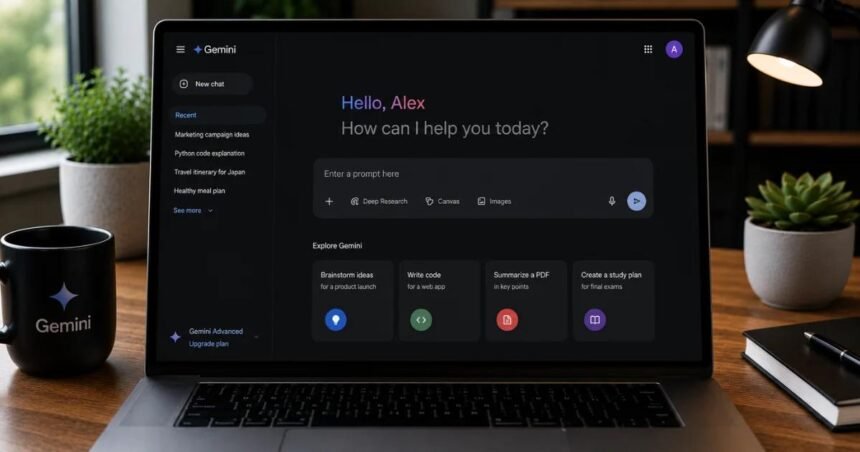
Developed by Google, Gemini is an artificial intelligence assistant that can help users understand information, write content, generate ideas, analyse supported files, solve problems and complete creative tasks. Depending on the model, plan, region and enabled features, it can also work with images, audio, video and other types of information.
Imagine a student who struggles to understand a difficult science chapter. Instead of reading the same paragraph repeatedly, the student can ask Gemini to explain the topic in simple language, provide examples and prepare practice questions. Similarly, a small business owner can use it to brainstorm marketing ideas, while a teacher can develop lesson plans and classroom activities.
Gemini becomes particularly useful for people who already rely on Google services. Eligible plans and supported configurations provide AI assistance within applications such as Gmail, Google Docs and Google Drive. However, the availability of individual features depends on the account and subscription.
Your AI assistant from Google+1
In this article, Minorstudy explores Gemini’s history, features, pricing, benefits, limitations, educational value and influence on society.
1. What Is Google Gemini AI and How Does It Work?
Google Gemini AI is a family of AI models and an assistant experience designed to understand prompts and generate useful responses.
Users communicate with Gemini through ordinary language. They can ask questions, request explanations, provide instructions or upload supported content for analysis.
For example, a student might write:
Explain photosynthesis in simple English, give five real-life examples and prepare ten multiple-choice questions for Class 10 students.
Gemini can generate an explanation and practice questions based on that instruction. The student can then ask follow-up questions to clarify confusing points.
Its main capabilities include:
Writing assistance: Drafting emails, articles, summaries and reports.
Education: Explaining concepts, preparing revision notes and generating practice questions.
Research support: Organising information and assisting with research tasks.
Programming: Explaining code, identifying possible errors and helping developers solve problems.
Creative work: Brainstorming stories, slogans, campaign ideas and outlines.
Multimodal assistance: Working with supported text, images, audio and video inputs.
Productivity: Assisting with tasks in supported Google Workspace applications.
The results depend on the quality of the prompt, the available model and the information provided. Gemini can also produce inaccurate answers, so important facts should be checked against reliable sources.
2. History and Evolution of Google Gemini AI
The development of Gemini reflects Google’s wider investment in artificial intelligence and its efforts to make AI more accessible.
2010s: Foundations of modern AI
Google and its research teams advanced machine learning, neural networks and language-processing technologies. These developments helped establish the foundation for more capable AI assistants.
2023: Bard enters the public conversation
Google introduced Bard as a conversational AI experiment, allowing users to ask questions and explore generative AI.
December 2023: Gemini models announced
Google announced its Gemini model family, highlighting capabilities designed for different types of AI tasks.
February 2024: Bard becomes Gemini
Google renamed Bard to Gemini and introduced further ways for users to access its AI assistant.
2024–2026: Expanding capabilities and integration
Google continued expanding Gemini’s models, creative tools, research capabilities and integration with supported productivity applications.
Historical overview: Google’s product names, models and availability evolve frequently. The timeline above highlights major milestones rather than every release.
3. Ten Powerful Benefits of Google Gemini AI
1. Makes learning easier for students
Students often find complex subjects difficult because textbooks may contain unfamiliar terminology or explanations that do not match their learning style.
Gemini can simplify topics, create examples and explain concepts step by step. A student learning mathematics can ask for a worked example, while a history student can request a chronological summary of an event.
The most effective approach is to use AI as a tutor rather than a shortcut. Students should attempt problems themselves, compare explanations with their textbooks and practise answering questions independently.
2. Supports teachers and educators
Teachers spend considerable time preparing lesson plans, classroom activities, quizzes and revision materials.
Gemini can help generate draft lesson plans, suggest discussion questions and adapt explanations to different age groups. Educators can then review and modify these materials to suit their students.
This can reduce repetitive preparation work, leaving teachers more time for personal guidance, classroom interaction and student development.
3. Improves writing and communication
Writing a professional email, project report or blog article can take considerable time.
Gemini can suggest outlines, improve sentence clarity, change the tone of a message and identify possible grammatical problems. For example, a student applying for an internship can request a professional email draft and then personalise it.
Writers should still verify facts, maintain their own voice and avoid publishing AI-generated material without appropriate review.
4. Connects with Google Workspace
One of Gemini’s important advantages is its connection with Google’s productivity ecosystem.
Depending on the subscription and enabled features, Gemini can help users draft emails in Gmail, refine documents in Google Docs and summarise or find information across supported Google Drive content.
Gmail Help+1
This can be valuable for students, bloggers, office workers and businesses that already use these applications daily.
5. Helps with coding and technical learning
Beginners often struggle with programming errors, unfamiliar syntax and complicated technical documentation.
Gemini can explain code, suggest debugging approaches and help users understand programming concepts. It may also assist with planning small projects or comparing different technical solutions.
However, AI-generated code is not automatically secure or correct. Developers should test it, review dependencies and understand the code before using it in production.
6. Encourages creativity and brainstorming
Sometimes the hardest part of a project is getting started.
Gemini can suggest blog topics, presentation structures, campaign ideas, fictional scenarios and social media content. Users can ask it to generate several alternatives and compare their strengths.
For creators, the greatest benefit is not simply producing more ideas. It is using those ideas as starting points for original work.
7. Supports research and information organisation
Research can involve reading lengthy documents, comparing different arguments and extracting relevant points.
Where supported, Gemini can help summarise supplied material, organise notes and identify questions that deserve further investigation. Research-oriented features may also help users explore a topic through multiple sources.
Nevertheless, summaries can omit important details. Users should inspect the original material, verify citations and distinguish established evidence from speculation.
8. Helps small businesses improve productivity
Small businesses frequently operate with limited time, budgets and staff.
Gemini can help business owners draft product descriptions, outline marketing campaigns, prepare meeting agendas and organise project plans. It can also assist with brainstorming customer-service responses and business presentations.
For a small educational website, for example, it may help develop article outlines, FAQs and editorial calendars.
It cannot guarantee increased sales, accurate financial forecasts or business success. Human judgement, market research and customer feedback remain essential.
9. Offers flexible assistance across different tasks
Unlike a narrowly specialised application, a general-purpose AI assistant can support many different activities within one conversation.
A user might begin by asking for an explanation of renewable energy, request a comparison table and then develop a presentation outline on the same subject.
This flexibility makes Gemini useful for people whose responsibilities change throughout the day.
10. Makes technology more approachable
Not everyone has advanced technical skills. Conversational AI lets people express their needs using everyday language instead of learning complicated software commands.
Students, teachers, professionals and lifelong learners can ask follow-up questions until an explanation becomes clearer.
This accessibility is a meaningful benefit, although differences in language support, internet access, digital literacy and subscription costs can still prevent some people from benefiting equally.
4. Google Gemini AI Features You Should Know
Conversational AI
Ask questions, refine instructions and explore a topic through follow-up prompts.
Writing and summarisation
Draft content, simplify complex passages and organise information into useful formats.
Image and creative tools
Supported plans may provide image generation, editing and other creative capabilities.
Research assistance
Research tools can help investigate questions, organise findings and explore information.
Google Workspace integration
Eligible users can access Gemini assistance within supported Google applications.
Feature availability, usage limits and supported languages vary. Check the official Gemini website for the features available to your account.
Your AI assistant from Google+1
5. Google Gemini AI Costs and Pricing in India
One of the most common questions is whether Gemini is free. The answer is that Google offers free access alongside paid AI subscriptions and business plans.
The following prices are listed on Google’s India-facing consumer pricing page at the time of research. Confirm the current checkout price before subscribing, as prices, promotions, taxes and plan benefits may change.
| Plan | Listed price in India | Best suited for |
|---|---|---|
| Gemini free access | ₹0/month | Casual users and beginners |
| Google AI Plus | ₹399/month | Users seeking more features and higher usage limits |
| Google AI Pro | ₹1,950/month | Frequent users, students and professionals with demanding workloads |
| Google AI Ultra | From ₹6,500/month | Heavy users who need higher limits and advanced tools |
Source: Google’s official India-facing Gemini pricing page.
Your AI assistant from Google
What should students choose?
Beginners: Start with free access and learn how to write effective prompts.
School and college students: Consider a paid plan only if its additional capabilities justify the cost.
Content creators: Compare usage limits, research tools, storage and creative features before upgrading.
Businesses: Evaluate business-specific plans, administrative controls and data-protection requirements.
These are consumer AI subscription prices, not the total cost of every Google Workspace or business offering. Eligibility and features vary by account.
Money-saving tip: Do not purchase a subscription simply because it is popular. Identify the tasks you need to complete, test free access first and upgrade only when you repeatedly encounter a meaningful limitation.
6. Google Gemini AI vs ChatGPT vs Microsoft Copilot
Choosing an AI assistant depends on how you intend to use it.
| Feature | Google Gemini | ChatGPT | Microsoft Copilot |
|---|---|---|---|
| Main ecosystem advantage | Google services | OpenAI tools and supported integrations | Microsoft services |
| Learning assistance | Yes | Yes | Yes |
| Writing and brainstorming | Yes | Yes | Yes |
| Productivity integration | Gmail, Docs, Drive and other supported services | Depends on available tools and connectors | Microsoft 365 integration varies by plan |
| Free access | Available | Available | Available options depend on product and region |
| Paid plans | Google AI subscriptions | Multiple subscription options | Consumer and business offerings vary |
No single tool is best for every person. Features, usage limits, prices and integrations change over time.
For someone who works extensively in Gmail, Docs and Drive, Gemini may be a natural option. Users who prefer another ecosystem may find ChatGPT or Copilot more convenient. The most useful comparison is to test the same real-world task in each service and evaluate accuracy, usability, cost and time saved.
7. Important Facts About Google Gemini AI
Here are seven useful facts readers should understand before relying on Gemini.
It is an AI model family and assistant experience. Gemini refers to more than one individual model or feature.
It can support different kinds of tasks. Capabilities may include text, images, audio, video and coding, depending on the model.
It can help with learning. Users can request explanations, examples, quizzes and revision notes.
It integrates with Google’s ecosystem. Eligible accounts can access Gemini features in supported Workspace applications.
Free access has limitations. Paid plans may offer higher usage limits or additional tools.
It can make mistakes. Confident wording does not guarantee that an answer is accurate.
Privacy deserves attention. Users should understand the relevant account settings and data policies before sharing personal, confidential or sensitive information.
Official feature descriptions and pricing are available on Google Gemini and Google’s Workspace help pages.
Your AI assistant from Google+1
8. Daily-Life Impacts of Google Gemini AI
AI becomes valuable when it addresses genuine problems in everyday life.
For students
Gemini can help organise revision schedules, explain difficult topics and generate practice questions. Students should still solve problems independently and follow their school’s academic-integrity rules.
For teachers
It can support the preparation of lesson plans, worksheets, quizzes and accessible explanations, subject to teacher review.
For professionals
It can help draft reports, prepare meetings, summarise supplied documents and improve routine communication.
For entrepreneurs
It can help develop marketing ideas, outline business plans and organise customer communications.
For everyday life
It can assist with meal-planning ideas, travel itineraries, household schedules and explanations of unfamiliar subjects.
The wider benefit is time management. When used thoughtfully, AI can reduce repetitive work and give people more time to practise skills, build relationships and pursue meaningful goals.
However, convenience should not replace independent thinking. People still need to make decisions, check important information and take responsibility for their actions.
9. Significance of Gemini AI for Society
Artificial intelligence is becoming an important part of education, business, scientific research and public communication.
Gemini and similar assistants could contribute to society in several ways:
Educational access: Helping learners explore subjects beyond their immediate classroom resources.
Workplace productivity: Reducing the time spent on some routine writing and organisational tasks.
Digital creativity: Helping individuals develop ideas and produce early drafts.
Technology learning: Supporting beginners as they learn coding and other technical skills.
Communication support: Simplifying information and assisting with certain language-related tasks.
Nevertheless, society must address challenges such as misinformation, biased outputs, data privacy, unequal access to technology and the changing requirements of employment.
Schools and organisations should teach AI literacy alongside traditional skills. Students need to learn how to ask questions, verify evidence, protect personal information and recognise the limits of automated systems.
The goal should not be to replace human intelligence. It should be to use technology responsibly while strengthening human knowledge, creativity and judgement.
10. Limitations, Risks and Responsible Use
Despite its benefits, Gemini is not a perfect source of information.
Accuracy: It may produce incorrect facts, outdated information or misleading explanations. Verify important claims with authoritative sources.
Privacy: Avoid entering passwords, banking details, confidential business documents or sensitive personal information unless you understand the relevant protections and have permission to share it.
Academic integrity: Use AI to understand a subject and improve your work, not to misrepresent another person’s work as your own.
Overdependence: If you ask AI to solve every problem, you may miss opportunities to develop independent reasoning and practical skills.
Bias and fairness: AI outputs can reflect limitations in their training data or the way a question is framed. Compare perspectives and check evidence.
Financial cost: Premium plans may not be worthwhile for occasional users. Review actual usage before paying.
Responsible use means treating Gemini as an assistant whose work requires human judgement, not as an unquestionable authority.
11. Review Section: Is Google Gemini AI Worth Using?
Google Gemini AI Review
Editorial assessment for students, professionals and everyday users
Overall verdict
Gemini is worth trying if you want an AI assistant for learning, writing, brainstorming and productivity, particularly if you already use Google’s applications. Start with free access and evaluate whether the results genuinely improve your workflow before subscribing.
This is an editorial assessment of the tool’s capabilities, not a hands-on benchmark or a survey of customer ratings.
Advantages
Conversational and accessible interface.
Useful for drafting, explanations and brainstorming.
Integration with supported Google applications.
Free access for users who want to try AI assistance.
Additional features available through eligible paid plans.
Disadvantages
Responses can contain errors or unsupported claims.
Some features have usage limits or require subscriptions.
Availability can differ by region, language and account.
Human review remains necessary for important decisions.
Who should use it? Students, teachers, researchers, content creators, professionals and business owners who can benefit from AI-assisted tasks.
Who should be cautious? Anyone working with confidential information, high-stakes decisions or tasks requiring complete factual accuracy without independent verification.
12. How Students Can Use Gemini AI Effectively
Students can get better results by giving clear instructions rather than typing vague questions.
For example, instead of writing “Explain science,” try:
Explain renewable energy for a Class 10 student in simple English. Compare solar and wind energy, provide five real-world examples, identify three limitations and create ten revision questions with answers.
A good prompt usually identifies the topic, the student’s level, the desired format and the purpose of the task.
Students can follow this practical workflow:
Ask Gemini to explain a topic in simple language.
Read the relevant textbook chapter.
Ask follow-up questions about confusing concepts.
Solve practice problems without assistance.
Check answers and correct mistakes.
Create a short revision summary in their own words.
This method encourages active learning instead of passive dependence.
13. Frequently Asked Questions About Google Gemini AI
What is Google Gemini AI used for?
It can help with writing, learning, research, coding, brainstorming, summarising supported content and productivity tasks. Its capabilities depend on the model and available features.
Is Google Gemini AI free?
Yes. Google offers free access to Gemini. Paid Google AI subscriptions provide additional capabilities or higher usage limits, depending on the plan.
Your AI assistant from Google
Is Gemini better than ChatGPT?
Neither is universally better. Gemini may suit people who prefer Google’s ecosystem, while ChatGPT may suit users who prefer OpenAI’s tools and available integrations. Compare both using your actual needs.
Can students use Gemini AI for studying?
Yes. Students can use it to understand concepts, generate revision questions, organise notes and practise problem-solving. They should verify answers and follow academic-integrity rules.
Can Gemini AI work with Gmail and Google Docs?
Eligible accounts and plans support Gemini features in Gmail, Docs and other Workspace applications. Availability differs by subscription and configuration.
Google Drive Help
Can Gemini AI generate images?
Google offers image-generation and editing capabilities through supported Gemini experiences. Specific models, usage limits and access depend on the plan and region.
Your AI assistant from Google
Is Google Gemini AI safe?
It can be used responsibly, but no AI tool should be treated as risk-free. Review privacy settings, avoid sharing sensitive information unnecessarily and independently verify important responses.
Can Gemini AI replace teachers?
No. It can assist with explanations and educational preparation, but teachers provide human understanding, feedback, classroom management, mentorship and support that an AI assistant cannot fully replace.
Can Gemini AI help bloggers and website owners?
Yes. It can assist with topic research, article outlines, FAQs, editing and content planning. Bloggers must fact-check claims, respect copyright and create content that provides genuine value to readers.
Does Gemini AI require an internet connection?
The online Gemini assistant generally requires internet access. Specific device or product features may differ, so users should check the requirements of the application they intend to use.
14. Important Points to Remember
Gemini is an AI assistant developed by Google.
It can support learning, writing, research and productivity.
Google Workspace integration is an important advantage for eligible users.
Free access is available, while premium plans offer additional benefits.
Pricing and feature availability can change.
AI-generated answers should be checked before important decisions.
Students should use Gemini to strengthen understanding, not avoid learning.
Privacy, originality and responsible use matter as much as convenience.
Conclusion: The Positive Future of Google Gemini AI
Google Gemini AI represents an important development in how people interact with information and technology. It can help students understand difficult subjects, teachers prepare learning materials, professionals organise their work and entrepreneurs explore new ideas.
Its connection with Google’s ecosystem makes it particularly relevant to users who already depend on Gmail, Docs and Drive. At the same time, subscriptions, usage limits, accuracy concerns and privacy considerations deserve careful attention.
The most important lesson is that technology becomes valuable when people use it with purpose. A student who asks thoughtful questions, checks the answers and practises independently can learn more effectively. A professional who reviews AI-generated work can save time without sacrificing quality.
For Minorstudy readers, the message is simple: learn with AI, think independently and use technology responsibly. Gemini can be a helpful companion, but curiosity, discipline, creativity and human judgement remain essential.
The future will belong not merely to people who use artificial intelligence, but to people who understand how to use it wisely.
Best wishes for students and lifelong learners
May every student develop the confidence to ask questions, the patience to understand difficult concepts and the courage to explore new opportunities. May technology support education, creativity and meaningful progress for individuals and society.
Minorstudy wishes all learners a future filled with knowledge, innovation and positive growth.
Publishing checklist for Minorstudy
Official resources